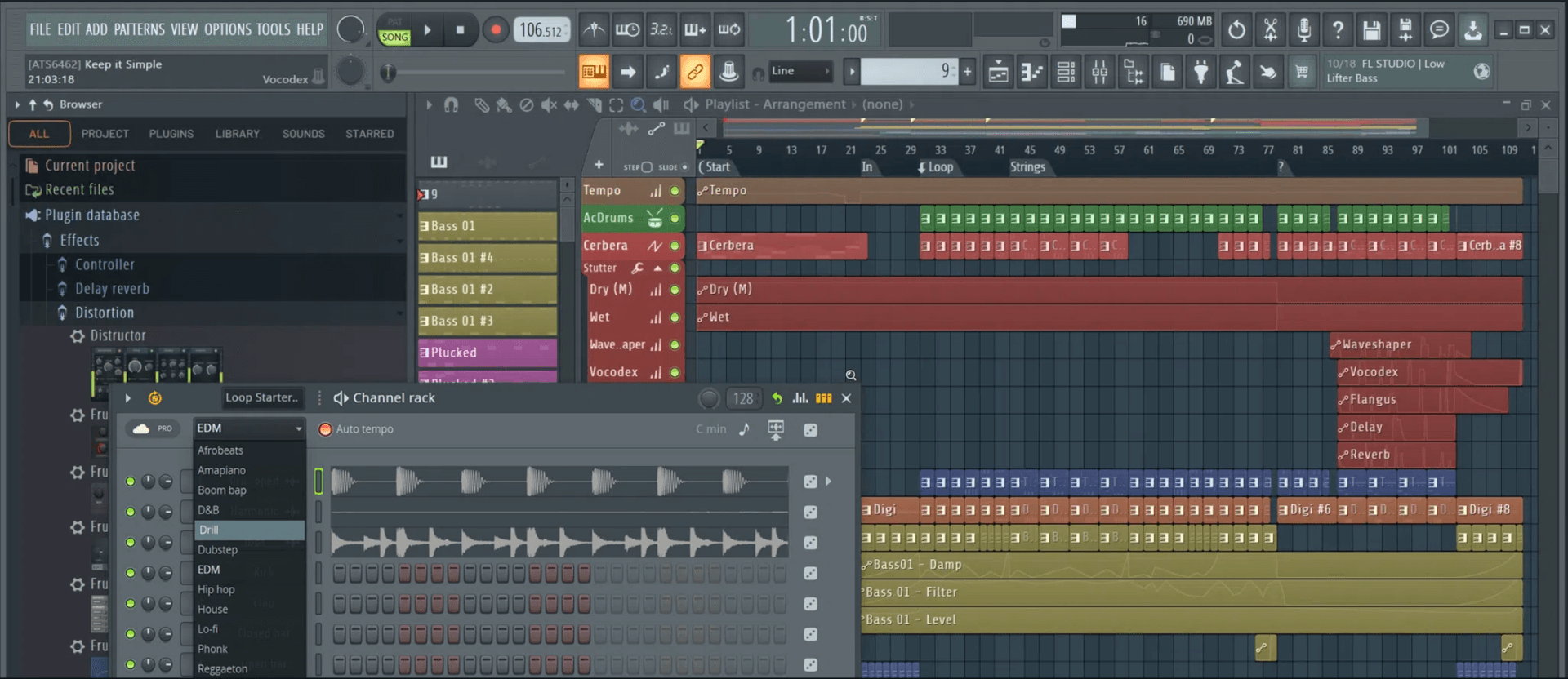
FL Class | Nashville
FL Studio Course
Build Beats. Shape Sound. Finish Tracks.
FL Studio has become a go-to DAW for electronic music producers and beat-makers around the world—but whatever your genre, if FL is your weapon of choice, and you want your name on this list of notable users, this course will give you the tools and confidence to have the best chance.
In Nashville, a city built on songwriting and recording, this course is taught by producers who work in its studios. Classes are small and hands-on, and the same sessions are available live online, using our specialist music collaboration software, Muse.
Main Menu Bar
- →File Menu
- →Edit Menu
- →Add Menu
- →Patterns Menu
- →View Menu
- →Options Menu
- →Tools Menu
- →Help Menu
Toolbar
- →Editing the Toolbar
- →Main Menu
- →Title & Hint Panel
- →Transport Panel
- →CPU & Memory Panel
- →Global Snap Panel
- →Output Panel
- →Online Panel
- →Pattern Panel
- →Shortcut Icons
- →Time Panel
- →Multilink Controllers Icon
- →Main Volume & Pitch Panel
- →Window Controls
File Browser
- →Plugin Database
- →Project Browser
- →Advanced folder stuff
Channel Rack & Step Sequencer
- →Channel Button Menu
Channel Settings
- →Main Control
- →Sampler Setting
- →Instrument Setting
- →Miscellaneous Setting
- →Automation Clip Setting
- →Layer Setting
- →Plugin Window Setting
Piano Roll
- →Piano Roll Arpeggiator
- →Piano Roll Articulator
- →Piano Roll Chopper
- →Piano Roll Claw Machine
- →Piano Roll Flam Tool
- →Piano Roll Flip Tool
- →Piano Roll LFO Tool
- →Piano Roll Key Limiter Tool
- →Piano Roll Menu
- →Import MIDI Data Dialog
- →Piano Roll Quantizer
- →Piano Roll Randomizer
- →Riff Machine
- →Piano Roll Scale Level Tool
- →Piano Roll Strum Tool
Playlist
- →Patterns
- →Audio Clips
- →Automation Clips
- →Performance Mode
Instrument / Generator Plugins
- →We explore all the instruments FL studio has to offer, which are too many to list here!
Mixer & Mixing
- →We dive deep into the vast mixing tools that come with FL Studio, which are too many to list here!
Recording: Audio, Notes & Automation
- →Audio Recording
- →Audio Interfaces (USB Microphones)
- →Note Recording
- →Note Step Entry
- →Automation Recording
- →Linking USB/MIDI Controllers
- →MIDI Scripting
- →Preconfigured Controllers (USB/MIDI)
- →Linking Internal Controller Plugins
- →Mapping Formula
- →Automation Clips
- →Automation Event Editor
- →LFO Tool
- →Scale Levels Tool
- →Import MIDI Data Tool
Edison Wave Editor & Recorder
- →Edison: Sample Properties
- →Edison: Amp Tool
- →Edison: Blur Tool
- →Edison: Convolution / Reverb Tool
- →Edison: Claw Machine Tool
- →Edison: Drum Tool
- →Edison: Equalize Tool
- →Edison: Noise Removal Tool
- →Edison: Script Tool
- →Edison: Time Stretch / Pitch Shift Tool
- →Edison: Tune Loop Tool
ReWire Support
- →Client Mode
- →Host Mode
Installing & Using VST / AU Plugins
- →FL Studio as a Plugin (VST / AU)
Whether you're a complete beginner or already making tracks in FL, this 36-hour course delivers deep, structured training in music production, beat-making, and engineering. We cover every major element in detail, packed with real-world tips and techniques that even experienced users find game-changing. You’ll leave with a solid workflow, polished production skills, and a competitive edge over anyone stuck in YouTube rabbit holes.
Classes are live and interactive—in-person or live online—so you can ask questions and get feedback in the momentwhen you're inspired... or confused. It’s this kind of immediate, practical support that makes in-person learning so effective. Discover qualities that distinguish us, here.
Student reviews.
“The course is very friendly and engaging. Any and all questions will be asked with no hesitation or frustration, and it helps everyone else in the class that might have the same question in mind.”
Ryan Conway
Instructors
Common questions, answered.
About as close as you can get - from the menus and toolbars through the Channel Rack, Piano Roll tools, mixing, plugin support, recording and Edison's editing tools.
Yes - see FL Studio Private Instruction to connect with a specialist.
Fully live and interactive, in-person or online, so you can ask questions and get feedback in the moment.
No - it works for complete beginners as well as people already producing in FL who want deeper, more structured training.
36 hours as a group course, or 20 hours as 1-on-1 instruction.
$1499 + $100 Registration if booked 14 days before start or $1799 + $200 Registration
Let's get you started.
InquireWhat Are MIDI Interfaces?
All about MIDI The MIDI (Musical Instrument Digital Interface) standard has had a profound impact on the music industry since its introduction in the early 1980s. MIDI allows electronic musical instruments, computers, and other digital equipment to communicate with each other, allowing for the creat
Read →Drum Miking Techniques
Drum Miking Techniques: Recorder Man and Glyn Johns Katie Gilchrest's take on drum miking techniques Many considered the drum set one of the hardest pieces of equipment to mic in a studio. A drum kit is not one instrument, but a collection of multiple instruments, featuring a wide variety of differe
Read →How to EQ Vocals
How to EQ Vocals Katie Gilchrest's guidelines on how to EQ vocals. For most styles of music, vocals are one of the most important parts of the mix. Poorly EQd vocals can cause detriment and distraction to an otherwise great song. Equalization using a parametric EQ is a tool that can allow vocals to
Read →Music Video Ideas for Artists — That Aren’t Music Videos
Did you know that YouTube traffic makes up nearly a ⅕ of ALL internet traffic? Similarly, quite a bit of that is music consumption. It’s also common for labels to upload an audio tracks as video for YouTube,
Read →Sound Design with Macro Variations in Live 11
By Heinrich Zwahlen The ability to store the state of Macro Controls as preset variations in Racks has drastically increased the functionality of these already...
Read →Recording While Traveling
A harmonious combination; new places, new people, new ideas and new sounds in different lands that present their own rhythms and culture can stir up something good in a natural and genuine way when recording while traveling. The perfect time to try new things, tune your ear, hone your craft, become
Read →